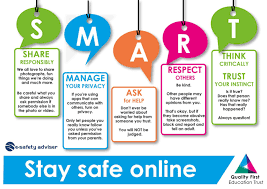
In today’s world, online learning has become a normal part of education. Students attend virtual classes, complete homework using digital tools, and search for information on the internet every day. Learning online is convenient and flexible. You can study from home, learn at your own pace, and explore topics that may not even be available in your school. However, just like the real world, the online world has risks. Not every website is safe, not every message is trustworthy, and not every person online has good intentions. That is why online safety is extremely important for every student.
Staying safe online is not difficult. You just need to understand some smart habits that keep your information private and your experience positive. Let’s break it down step-by-step so that learning online becomes safe, enjoyable, and stress-free.
1. Be Careful About Sharing Personal Information
One of the biggest mistakes students make is sharing too much online. For example:
- Full name
- Home address
- School name
- Phone number
- Photos and personal videos
Sharing these details can make you a target for scammers or strangers. The rule is simple:
If you would not tell something to a person you just met in real life, do not share it online.
Even when you sign up for apps or websites, double-check why they need your data. If something feels unnecessary or suspicious, avoid it.
2. Use Strong Passwords and Keep Them Private
Your password is like the key to your digital world. Never use simple passwords like:
- 12345
- your name
- your birthdate
Instead, create strong passwords using a mix of:
- Uppercase letters (A, B, C…)
- Lowercase letters (a, b, c…)
- Numbers (1, 2, 3…)
- Symbols (! @ # $ %)
For example:
TreeHouse!92 is much safer than treehouse or 123456.
Also:
- Do not share passwords with friends.
- If your device allows, use two-factor authentication for extra security.
3. Think Before You Click Any Link
Sometimes websites look attractive or offer something “for free.” But these could be scams.
A single click on the wrong link can:
- Install a virus
- Steal your data
- Lock your device
So before clicking:
- Check the website name
- Avoid pop-up ads
- Ignore random download buttons
If a link feels suspicious or looks too good to be true, just skip it.
4. Learn to Recognize Fake Information
The internet is full of helpful knowledge — but also full of misinformation. Some websites spread wrong facts on purpose.
To check reliability:
- Search the same information on different websites
- Prefer educational, government, or library-based websites
- Ask teachers if something doesn’t seem right
Being a student means not just collecting information, but learning how to evaluate it.
5. Be Kind and Respectful During Online Classes
Online spaces are also real spaces.
What you say online affects real people.
So:
- Do not tease or bully classmates in chats
- Do not share screenshots of private conversations
- Do not interrupt during class sessions
Respect builds a positive environment for everyone.
6. Protect Your Device
Your device is your learning tool. Keep it safe by:
- Installing antivirus software
- Updating your system regularly
- Avoiding illegal downloads
- Not connecting to unknown public Wi-Fi networks when possible
A protected device helps protect your data too.
7. Take Breaks to Protect Your Mental Health
Online learning can make you stare at the screen for long hours. This leads to:
- Headaches
- Eye strain
- Fatigue
- Stress
Practice the 20-20-20 rule:
Every 20 minutes, look at something 20 feet away for at least 20 seconds.
Take short breaks to move around, stretch, and drink water.
A healthy mind learns better.
8. Report Anything That Makes You Uncomfortable
If someone online:
- Asks for personal photos
- Uses inappropriate language
- Tries to meet in person
- Threatens or pressures you
Tell a trusted adult immediately.
You do not need to deal with that alone.